Thursday, 7 April 2016

CIE EVALUATION Q3 DEVELOPMENT OF PRODUCTION SKILLS

you can find more on the Evaluation overall in this hub post.

CIE Q3
HOW DID YOUR PRODUCTION SKILLS DEVELOP THROUGHOUT THIS PROJECT?
See this post for a list of points you can consider, and also a suggested framework.
This is quite similar to the UK Q7 - have a look at Kate's answer  or Curtis' (both a plain blog post). Molly's was very thorough and more multimedia - here's her 3-part answer:


Tilly, who reflects here on having delivered an unsatisfactory AS production (she produced a new film and blog the following year), provided vodcast and well presented transcript; this may inspire you - its a simple but effective way to achieve most of the filming required, a fairly easy job to later edit in screenshots and clips etc


More guidance below the line...

CIE EVALUATION Q2b DISTRIBUTION

you can find more on the Evaluation overall in this hub post
OCR Q3 DISTRIBUTION: What kind of media institution might distribute your media product and why?

- CIE Q2b 'how would it be distributed as a real media text'


**I've just added a lengthy post specifically using the horror distribution example...**


This is a key Q for exam prep, not just coursework, so obviously keep going back to the WT/Warp comparison with specific examples (but you'll be drawing on more for wider contexts). I've given a new (2019) 8-part stepped guide, but retained 2 older versions below as well. Use cinema blog tags etc to find useful posts, but also make use of handouts, not least the WT + Warp distribution packs, which have distributor, budget etc etc listed + brief distribution summary paragraphs. There are multiple tags + links list screenshots at the end, + some good egs of past student vids.

'how would it be distributed as a real media text'

A (2019) STEPPED GUIDE TO ANSWERING WHO WOULD DISTRIBUTE YOUR FILM

A NOTE ON THE CREATIVE ASPECTS
I highly recommend using the ...Millionaire quiz template for this as the creative part of the answer (perhaps add a director Q+A at festival or Curzon member screening). Then clearly address the question in any combination of blog post, ppt/Prezi, video, following the points below. We'll look at an example in a lesson.

1: SHOW YOU UNDERSTAND THE TERM
How is distribution distinct from the other parts of the film cycle (production, exhibition)? What does a distributor do that is different from what a production company, or a cinema, does?

2: IF IT WAS A TENTPOLE MOVIE; BIG 6...
Before exploring how it might work for your (presumably) low budget film, look at who dominates film distribution. Look for a graph/stats on the big 6 (7? 5? its a fluid industry: Lionsgate; Universal/20C Fox merger) and their share of UK, US, global box office. Explain the tentpole strategy, what Elberse calls the Blockbuster strategy (any quotes from her book would be good, she does include a film industry case study).

Screenshot UK/US/global current weekly or annual top 10 that includes a column for distributor to help establish their utter dominance as an ongoing fact. Make sure you check ownership of any names you're not familiar with (they'll probably be a big 6 subsidiary!!!).

CIE EVALUATION Q2a AUDIENCES

you can find more on the Evaluation overall in this hub post

OCR Q4 AUDIENCE: Who would be the audience for your media product?
OCR Q5 ATTRACT AUDIENCE: How did you attract/address your audience?

- CIE Q2a 'how does your product engage with audiences'

Marketing is part of distribution, but you can also consider marketing here, explore how your film MIGHT be marketed. It is advantageous if you have set up any spin-off social media, but can also think about your blog and YouTube channel as 'real-world' means of engagement.
Consider the active steps that might have helped promote and gain publicity for, awareness of, your film.
Attracting an aud doesn't just mean using glamorous actors! How did you publicise, promote your film? Did you engage in viral marketing, releasing entertaining snippets during production? Teaser clips? Preview screenings with a sample target audience (perhaps hoping that they'd generate more publicity through word-of-mouth, as well as providing key feedback on what was/wasn't working for the target aud)? Behind-the-scenes featurettes? Interactive blog features? What social media did you use? Use screenshots from FB (just ensure you protect any personal info!!!), Twitter etc, + from YouTube showing comments/no. of views (you can include my channel too for this).

A good starting point, one you will have blogged on from existing films: how you framed (and communicated to the audience) who the central protagonist is - point-of-view shots, central framing, angles...
Have you used narrative enigma to draw in and 'hook' your audience?
Have you used humour (perhaps a false scare)?
What knowledge would a viewer need to follow your preferred reading?
Have you employed regional accents, dialect? Slang [aka 'teen skatz'; give specific egs!]?
Remember: representations are relevant here - briefly note how your choices here touch on your audience.
Presumably you've provided the audience with a 'priviliged pov' (they can see more than any single character can; s-rev-s is one common eg, but also opening est. shots), but perhaps you've included specific pov shots (or others, eg tracking) to signify the protagonist? Are we encouraged to identify and/or sympathise with one particular character (perhaps they're on screen first/more often; we get their povs?)
Is there any focus on the body? Laura Mulvey, a feminist critic, argued that audiences are typically positioned as male; the camera lingering on a female body positions us as a male, heterosexual viewer.
Have you used specific genres of music?
Have you used sound to lead the audience, but (espec for horror) also as an example of genre signifiers which much of your target audience might enjoy? Which other genre signifiers have you used?
Have you employed gore or (within the limitations of a school production) sexual content to attract an aud (refer back to the male gaze)?
Have you used intertextuality? (references to existing texts, eg posters within a room you've shot in; character names - if you want to explore some theory, this is an example of postmodernism)
You can AND SHOULD add some self-critique: 'here we tried to ... but this wasn't completely successful'

UK-EQUIVALENT STUDENT EXAMPLES:
Poppy: vodcast which could be much better illustrated, but is a succinct breakdown of the target audience:

Here Poppy uses YouTube's annotation tool to good effect!


Molly: blog post that isn't so well presented but is thorough and clearly demonstrates a lot of exam-centred learning too.
Here Molly uses the YouTube annotation tool - and its a smart move to make this clear as she does!!!


Use p.12-15 of guide:

CIE EVALUATION Q1b REPRESENTATIONS

you can find more on the Evaluation overall in this hub post.

OCR Q2 REPRESENTATIONS: How does your media product represent particular social groups?

- CIE Q1b 'how does it represent social groups or issues'

DIRECT EXAM LINK:
This is essentially practice for the first half of your exam.
You need to apply both elements of semiotics:
  • specific and precise denotation
  • analysis of possible connotations 

UK-EQUIVALENT STUDENT EXAMPLES:
Kate: a clear vodcast with a transcript provided:


Poppy: vodcast and transcript; the key strength is a tight focus on how the choices reflected genre knowledge and there intended to reflect the desires and expectations of the target audience


Molly: blog post - combines analysis of the common categories with a character by character breakdown

Work through the embedded PowerPoint below for a range of suggested theories and terms
THE STUART HALL ISSUE:
How YOU planned to represent and have audiences respond to people and places in your film is not necessarily how they did - it would be useful to include some audience feedback and reflection on this. Where was there polysemy that enabled some audience members (perhaps of certain demographics: gender? age? nationality?) to give a negotiated or even oppositional reading?

REPRESENTATION OF WHO OR WHAT? + AUDIENCE ISSUES
You can approach this question in two fundamental ways: tackling one category of representation at a time OR separately analysing each character and place in turn.

CIE EVALUATION Q1a CONVENTIONS

you can find more on the Evaluation overall in this hub post.

CIE Q1a 'how does your product use or challenge conventions' 
OCR Q1 CONVENTIONS: In what ways does your media product use, develop or challenge forms and conventions of real media products?
 

ILLUSTRATING YOUR ANSWER
Its a good idea to use screenshots of blog posts and links lists as well as from film openings - keep making it clear how much you've researched and how well you've applied this! SHORT clips from existing texts are legally fine under the fair usage copyright law, but longer clips just risk your video being blocked. Only use the sound from a clip if its absolutely necessary - and consider cutting in and out of the clip's sound, or editing the audio levels to make sure your voiceover is clear.
It is good practice to clearly identify films - but if you're covering too many it may be too time-consuming to keep adding titles. I discuss vodcast design in this post.
There are many excellent examples of UK OCR answers on the related Q1, e.g. Molly: plain post, but detailed. Poppy: vodcast + transcript. Kate: vodcast + transcript. Here's Kate's (2013):


Below: a playlist of some of my vodcasts on film openings; you can see how you can quickly go into considerable detail on seemingly small topics if you wish to.


Below: the opening shot of the trailer shows a 9-way splitscreen effect I used for my 2014 documentary film; you can use this technique for any number of screenshots/clips too (with or without a freezeframe behind)
 

2 SUGGESTIONS FOR ANSWERING THIS QUESTION
NOTE: These aren't especially creative approaches, but both do require useful application of technology. You might want to think of more creative approaches, or simply include a segment which is creative (like an ad break during your vodcast, ads for movies from/a book on your genre etc - neatly gets across conventions?!).

Wednesday, 6 April 2016

Researching your GENRE

If you are going to get marks for research and knowledge you need to clearly evidence your grasp of the genre(s if hybrid) you are working in. That would include:
  • useful genre resources: books + book chapters (or even samples through Amazon inside, googlebooks, kindle free sample etc); websites; newspaper sections; specific articles; fansites; YouTube videos, playlists, channels
  • films to analyse - and which you can actually access! Every group should look at least 10 from the genre - its a good idea to include Warp and Working Title in your search! - but the level of detail you blog on these can vary
  • history: key films, directors, stars, companies
  • conventions, including specific character types and narrative devices
  • distinct (from general examples) film opening conventions
  • typical age rating 
  • typical budgets and casting
  • box office record and critical standing
If you're working on rom-com or horror (especially slasher) then look for tags but also the blogs on these, eg BritCinema blog: rom-com, slasher.

OPENINGS
Examine at least 10 within your group, and clearly summarise any distinctive elements or genre conventions you often see within openings for your specific genre. This often means particular narrative approaches and structures (perhaps a more detailed version of Todorov's concept - like Nowell's slasher structure) and character types (that may be also fit within Propp's model but have specific names for the genre: eg jock, cheerleader, scream queen, final girl).
You can again use a mix of detailed single film overviews and individual elements such as titles or sound.
This research really needs to be ongoing - it doesn't matter if it is simply ONE detail from a film, keep blogging on any findings that might influence your work. Editing is often improved by revisiting and reviewing openings you've looked at - if you pick up something new, add it into a fresh post, keep evidencing both your journey and how your research and knowledge is being applied.


FINDING RESOURCES
Amazon is a good place to start a book search, so too Googlebooks ... but also your Library. Use chapter lists as well as book indexes to search for useful chapters or sections on particular films or directors. Books mostly won't use the word 'genre' in their title, so you'll need to experiment, and look at the categories your results appear in.

Its a good idea to identify Working Title and Warp movies from your genre!

Following initial research and feedback make sure you can access any films you've shortlisted to analyse. If ordering any DVDs or VoD, make this part of your film budgeting, and don't delay.
Many quality newspapers like the Guardian will have a section for articles on a particular film genre - look for links lists on my genre blogs, or search (eg guardian horror film helped me find this).

Reading box office columns (I also recommend The Guardian for this, as they cover UK, US and global) will help you find some very specific, recent analysis; is a good, reliable source; is helpful to deepen your understanding for the exam too. You can click through the column listings or try searches like guardian gant horror film.

Fansites (and social media pages) can be useful to help show how you've used and integrated a range of technology (evaluation question 4), including for audience feedback - but be aware that the level of language used on many online forums can be an issue. A sample search: facebook horror movie fans.

Be careful with the quality of sources. A search like slasher film conventions brings up lots of Prezis and PowerPoints on Slideshare - the quality is VERY variable! Make sure you ALL include some respected academic books as part of your research to ensure you don't rely on such material.

You can find the most recent, and upcoming listings by searches such as cinema release schedule 2016 and can try adding country or genre to this to narrow it down (eg slasher films release 2015). Sites you'll be familiar with like BoxOfficeMojo and The-Numbers will provide detail like this as well as all-time box office by genre. IMDB is another good source for lists. There are also many sites like FirstShowing dedicated to listing film releases. You can also look for a wider range with searches like horror films released since 2010.

You can gauge the critical standing of a genre by looking up the RottenTomatoes score of a sample, or doing a wider search.

You can dig deeper into distribution with searches like these:

Giving your film a WORKING title

From the earliest stage, any film production project needs to be given a name.
That name may very well change.
It may change more than once.
There may even be name changes for different markets (see Coz Greenop's story!) - US/UK distributors often use different titles.
But there is ALWAYS a working title by which to refer to the project.

There are many famous examples of movies that changed titles at any point in the pre-production, production, post-production or distribution phases (a distributor is staking money on successfully marketing a film, if they think the title is harming the branding they will change it):
  • Halloween was conceived of as The Babysitter Murders - the producer had the idea that everyone experiences babysitting, and managed to get John Carpenter to come up with an actual script for this very basic idea
  • Scream was initially Scary Movie - a name then used for the postmodern satire on Scream
  • Huge hit and franchise starter Alien may well have flopped if its working title had been retained: Star Beast!
You can find many more examples (including from your specific genre) through a simple search (which you can trying modifying for narrower results).

Thursday, 31 March 2016

CINEMATOGRAPHY Tips for low light shoots

http://nofilmschool.com/2016/03/reduce-noise-basic-tips-shooting-low-light

Friday, 18 March 2016

Film PITCHING guide from executives at SXSW

 See the main pitch guide here. Pitch tag.

A hit team of Hollywood producers discussed the art of pitching at a SXSW (the Texas festival) session. Quotes are from the article by Liz Nord (2016) How Not to Pitch a Movie: Production Execs Tell All.
NB: the article contains an image which may be considered disturbing/NSFW (poor choice from a great site).
I did learn a new term from this myself: sizzle reel! Read on [click the read more] to find out what that is!
Last year, Shaked Berenson's company got 28 scripts from agents, double that number from managers, and slightly more from producers. About ten times that number were unsolicited. 
Epic Pictures Group made five films that year.
Berenson and his fellow SXSW 2016 panelists, who have decades of Hollywood producing experience between them, gave a few pointers. The group included Gudrun Giddings, CEO of G4C Innovation; Travis Stevens, CEO of Snowfort Pictures (whose film Teenage Cocktail is playing at this year’s fest); and Winnie Kemp, Director of Development at Super Deluxe/Turner.

Friday, 19 February 2016

USEFUL TECHNOLOGIES Soundcloud Divshare + embedding podcasts/MP3s

See this post for a guide on getting an embed code for audio uploads, and on resizing that embedded player.

USEFUL TECHNOLOGIES: Prezi + other PowerPoint alternatives

Something you need to consider for your Evaluation - and use at earlier stages of blogging too.

See this post.

USEFUL TECHNOLOGIES: Free infographics tools

A great option for attractively presenting some of your research and analysis; see this post.

USEFUL TECHNOLOGIES: Google calendar

Great way to show your use of technology as well as to help evidence time management (and organisation of cast to boot if you share this with cast!!!), so just the three assessment criteria this can help with then!

Conal (A2 2014-15) produced his own guide, which you can read here. This group embedded their calendar at the bottom of the blog, a smart idea - I clicked back to December 2014 to get the screenshot below:


Thursday, 18 February 2016

USEFUL TECHNOLOGIES: Gadgets to add to your blogs

YOUR BLOG WILL SOON HAVE THESE GADGETS...
We will be adding some initial gadgets; you should be adding more as your blog grows. You are marked on Use of ICT, Presentation (of blog), and communication skills; these help with all of these, and will also make your blogs more helpful for you too.

You access 'gadgets' through LAYOUT and then clicking on ADD A GADGET. After you add each gadget drag them below your blog archive (unless its introductory TEXT or IMAGE of yourself or, later, the group) and SAVE ARRANGEMENT.


1: RSS FEED: Many websites enable you to display hyperlinked lists of recent articles by providing a link for a 'RSS feed'. If you can't see this you can always try adding /rss to the end of a website/page link and see if it works here. This helps make your blog more of a hub for your learning. When going through the steps just now (to generate screenshots), for example, I noticed an article on Richard Curtis and rom-coms which will be useful for your exam! try adding (and modifying) this link: http://www.theguardian.com/uk/film. Remember: once you're done click save to keep the RSS feed, then drag it below your blog archive and click SAVE ARRANGEMENT along the top.

Wednesday, 17 February 2016

Friday, 8 January 2016

IDENTS an overview

I'm not going to much content to this post - instead, use the IDENTS label/tag from the tag cloud on this blog.

At the time of writing 4 posts were tagged with 'idents'.

You can also find a links list with plentiful useful links to help accelerate your research on these.

WHAT RESEARCH SHOULD I DO?
You needn't spend too much time on this. You can present your findings as a standard, illustrated post or as a short vodcast (I've done a vodcast on this topic, see below) - which you can then re-use later as an element for your Evaluation work.

Your research should include looking at 10 or more examples (you could split this up if working in a group), and answering these questions. DO note countertypical, unconventional examples too, especially if you intend to challenge conventions:

Thursday, 3 December 2015

SWEDING: Tyrannosaur practice exercise

I've blogged on this before, but I'll bring together all you need into this post...

YOUR TASK: Take the archetypal Warp Films production Tyrannosaur, with its deeply flawed working class protagonist, disturbing social realism, low budget (mostly financed through grants and UK TV pre-sale of rights), lack of stars, critical acclaim (including TIFF) and US distribution issues contributing to a low box office ... and flip it into an equally archetypal Working Title production!

WT have produced well over 100 movies, so have worked in every genre and presented many depictions of Britain ... but you are focusing on an exaggerated snapshot of how the nature of this film, its characters, the setting/mise-en-scene, perhaps even the music, would change if this was made by them.

Your Tyrannosir swede will be rather silly, but will include versions of key scenes from the opening of the actual film. You will blog your screenplay, storyboards and any other preparation, and clearly outline how your ideas reflect your knowledge of both companies - using specific examples as illustration where possible (just as you would in the exam: EAA, with EX, and T).

Sweding is a concept that emerged from Michel Gondry's comedy Be Kind Rewind, starring Jack Black. Black's character enters a video store(!) and the magnetism he carries wipes out all of the video tapes ... so, he shoots new, no-budget versions. As part of the film's promotional campaign the audience were invited to submit their own daft 'sweded' films through a website, and the concept continues to inspire some very clever (and some not so!) UGC.

BE KIND REWIND TRAILER:


Monday, 16 November 2015

Reviewing and re-planning a bad shoot

The good news about a bad, unproductive shoot is that you can learn a lot from it, and be much better prepared the next time you're on a shoot! The same applies to films incidentally: a bad film will have you mentally working out what the filmmakers should have done!

I set out some pointers in this post, which you can use to help you with this review.

Your task is to discuss and agree on a list of things you will improve on before your next shoot - what didn't you do; what would have made this shoot more productive? Preparation is generally a key failing; a substantial amount of marks for coursework Research and Planning are linked to this for a reason! Formally storyboarding, scripting (screenplay) and preparing call sheets (shot lists) are all coursework requirements.

This is not an invitation to start finger-pointing; if you start that your review will be every bit as unproductive as the shoot itself!

For this discussion to work, you need to adhere to the principle of one voice at a time, and should consider appointing someone to lead and guide the conversation, including selecting who is speaking and deciding when to move on to another point.

----------------------------
Once you've all agreed on a clear, specific list of points which you can then each blog on, begin the process of re-planning - you will have a second opportunity at this on Wednesday 25th, periods 1+2.

Think clearly about the specific roles involved, and ensure that for each segment/location these have been specifically assigned. It is useful practice for you to share and rotate these. Consider how these roles might best combine: should the camera operators passively await instruction from a director for instance?

The workload must be fairly shared.

The footage from the original shoot is saved; we can discuss whether or not to edit this.

IF you manage to get this completed before I'm back then start working on further coursework research: each of you looking at multiple genre film openings; preparing vodcasts on locations, cast/characters, costume, props + mise-en-scene generally; genre signifiers and intertextuality; the idea + narrative; titles; soundtrack.

Saturday, 24 October 2015

SHOOTS ten tips for a successful shoot

I'm sure there are plentiful more learned guides out there - and I'd always encourage reading video/film-makers' books (Alex Cox is very readable on his low-budget Indie shoots) - but these are ten simple bits of advice based on years of observing student filming, especially the common disasters that happen...

Friday, 9 October 2015

Researching film titles design and fonts

Part of Molly's research from 2015, looking at several films in this post.
USE THE titles TAG FOR MORE POSTS!

Highlighted every year without fail by examiners as a weakness across the national entry, film titles need to be closely scrutinised before you make decisions on how to design yours, thinking about ...
THE RAW NUMBERS:

  • how many titles do you expect to see?
  • provide counter-examples with very few or no opening titles
  • what total running time is typical?
  • again, note exceptions


THE SPECIFIC WORDING + ORDER:
Look carefully at the precise wording for each of these:

  • companies (presents, a ... film/production, in association with...)
  • director (auteur theory reflected in TWO credits - a ... film, directed by; where do these come in the order?)
  • actors (introducing, starring, featuring, co-starring ...)
  • technical roles (you need to be clear on which you will include; look for specifics eg director of photography or cinematography by?)


THE DESIGN
Look at use of these aspects and how they are used to distinguish/denote relative importance:

  • (sans-)serif (consider to what degree titles connote genre here)
  • size (names usually bigger than role, by etc; bigger stars bigger title?)
  • colour
  • case (UPPER, lower, Sentence case, maybe mixed)


FX, ANIMATION
Some titles are simply static, but often there's some form of movement...

  • animation/movement/FX?
  • transitions or straight cuts? fade to/-in from black?
  • intertitles? (over black screen)


  • what to include (and exclude),
  • the timing (continuous with identical gaps? from the start or later in the opening? when do they end?),
  • the order titles appear in,
  • font (serif or sans-serif? upper/lower case, a mix?),
  • size and any variation of this (within titles and for different roles),
  • the specific wording,
  • the (auteur) convention around crediting the director twice, the wording and order of this,
  • checking if distributor and production companies receive different wording,
  • looking for variation in the presentation of stars, co-stars, new actors (introducing...),
  • the specific roles that are credited (as opposed to dumped into the end titles),
  • colour,
  • animation,
  • transitions (fade in/out? wipe?),
  • other design features (e.g. underline, graphic containers)
  • the main (film) title (is it differentiated?)

... there is a huge amount to think about (and later to explain and justify your choices)!!!

IN THIS POST: Links and video clips to help you with researching and getting ideas for film titles design. I'll blog separately on researching fonts and looking for a specific downloadable font. First, a vodcast - you'll need to create similar video guides...


FCPX plug-ins

Budget limitations may mean you'll have to pay for it yourself, but do be aware there are many great plug-ins out there for Final Cut Pro X (and most major video editing suites).

We looked recently at a very specific example, as students looked to emulate aspects of some depeche Mode videos they particularly admired:
FINAL CUT PRO X CAMERA EMULATOR PLUGINAs raised when looking at these, you can emulate super-8 and 16mm (etc) cameras by purchasing FCPX plugins (this one is $50 - you may need to buy it yourself and carry edited clips from your own Mac to a school one).
[copied across from a post on Depeche Mode and the French New Wave style]

Film Openings: What to blog on

I have covered this in much greater detail, including many examples, here. This is an abbreviated version where I've picked out a dozen key factors. There are of course others you could think about, and these categories considerably overlap ... but I hope this will help to really narrow down what to look for.

DENOTED DOZEN: KEY FEATURES OF FILM OPENINGS TO ANALYSE

1: IDENTS - how many; how long are these; what company type/s are featured: distributor, production?

2: 1ST SHOT - Discussing the semiotics, including Detailed denotation: what exposition is provided/withheld? Is it faded in? How long is the 1st take? Static or moving camera?
  • Don't twist your analysis to fit the genre, it doesn't always match the genre so neatly!
  • Consider exposition, narrative enigma, (non-)diegetic sound, anchorage/polysemy - sound is relevant as well as mise-en-scene.
  • Is the camera static or moving (does the shot/framing change?).
  • What does this shot lead into?
  • Looking ahead, you could apply Todorov's narrative model (equilibrium).

Wednesday, 7 October 2015

TASK: Starting to consider film opening conventions

Your coursework brief is to create the opening 2 mins of a new feature film including titles. Before embarking on any production in Media Studies, you must always thoroughly research and analyse the prevailing codes and conventions (not 'rules') of a given format, then look more closely at those of a specific (sub-)genre once you've settled on a firm production idea.

For the tasks below, you will consider the assessment criteria and how this research fits in, as well as what to consider, before starting to make detailed notes and blog on aspects of one example of a film opening. You will present your findings and take notes on others' findings before summing up your view of what the common conventions are in a series of short vodcasts.

TASK 1: [post] The role of researching conventions in our coursework
Using either your printed copy or an online version, look through the assessment criteria for all three marked sections of your coursework and note in this post any and all elements of this that are linked to researching the conventions of film openings (and film/genre conventions more broadly). Include any relevant Evaluation questions in your list.

TASK 2: [post] What I should look for when blogging on film openings?
We will discuss this in a class, after which you should consolidate your list of things to consider by carefully reading this post.

Ask if unclear about any terms.

TASK 3: [multiple posts] Titles, 1st shot, length of opening
You will each view and analyse ONE film opening, feeding individual findings, including typed detail and plentiful screenshots, into the following posts:

Sunday, 27 September 2015

2015 Blogs: Posts You Should Have So Far

Your blogs should be starting to build up a picture of your grasp of media language, semiotics and how the film industry works. You will have followed closely the very specific instructions on blog settings, and will have (perhaps with different titles) the following posts. Where I've put [Film Title] you should type the film title(!); I use the abbreviation WT for Working Title - you can use either.

When you receive blog comments please make changes within two days; if you're unsure or need help/clarification, please ask! You will be writing up a log of improvements across the year.

FORMATTING + PRESENTATION:
You can find MUCH more detail (and illustrations) in this post.
The post title should be short, pithy but clear. This will appear as large bold text, effectively your heading.

Provide clear sub-headings where relevant: adjust size, font, colour, bold.

Don't use underline or colour highlight.

Don't use Courier font.

Remember to highlight terminology with bold + pink.

Add relevant tags ('labels') to your posts.

Round box office up/down to a useful, memorisable figure, using k or m not 000 or 000,000.

Denote quotes of 2+ lines by changing font to Trebuchet, colour purple and clicking speech marks icon to indent. Provide the source; describe in a word or two, make bold - [] are advisable, e.g.: [BritCinema blog post]
More guidance on providing sources, and quoting, here.
Provide links as often as possible: if you're blogging on a film, making the film title (the first time you use it in a post) into an IMDB link is useful. If discussing box office, the boxofficemojo.com or the numbers.com link are useful. If quoting an article [source] or [article] are always expected. Always make it clear where your information comes from, even if its not a direct quote.
TIP: When adding images, videos or other embedded material, hit return, type ..., and go back to blank line before pasting in embed code. That will prevent later problems with adding more text. Before formatting a sub-heading or quote add a return/blank line with ... before highlighting text to format. That avoids having to re-format for 'normal' text. Same point for terminology: finish the sentence then format the terminology. If you've forgotten this, just copy some 'normal' text, paste it and type over it.
Always give the director, year of release + budget of a film you're analysing. This applies to essays too (budget isn't vital here), eg:
This is England (Meadows, 2006) sparked Warp's first franchise and demonstrates convergence with TV... [I've set this out as I do for quotes]

YOUR BLOG SHOULD HAVE THESE POSTS...

Sunday, 13 September 2015

SOFTWARE Editing with Pinnacle Studio aka Avid

Okay, so if you have the option you'd opt for Final Cut Pro X and editing on a Mac ...

If not, there are many options out there. Pinnacle Studio may not be as highly rated as Final Cut or Premiere, but it is a very powerful package, and in a different league to basic editors such as iMovie.

I've just started with it myself, and find it straightforward to use, but if you're new to video editing, or haven't moved beyond iMovie (or the even more basic Windows Movie Maker), it will take you a while to get used to it.

The best way to do that? Use it. Not to 'practice', but simply to edit video - practice film exercises, or vodcasts to better present your research. You could also spend time with it for non-Media or even non-school work. The more time you spend using it the more familiar it will become (and this will prepare you for other video editors; they may look different but there are common elements across most).

Pinnacle was bought up first by Avid then Corel; it is effectively the offspring of three big name software companies.

VIDEO CAN BE SLOW...
Video is best to get you started, but once you start looking for more specific guides and instructions do consider looking for text-based step-by-step guides too, which can be much quicker to use, and without the potentially annoying quirkiness of some of the presenters.

THE BEST THINGS IN LIFE AREN'T FREE?
Unlike Final Cut, I can't see any paid-for online courses (indeed, you can gain Apple certificates in Final Cut!) on the likes of Lynda.com for Pinnacle Studio. However, there is a 2013 guide book by Jeff Naylor, listed at £30 on Amazon UK. This offers a series of tutorials as well as a reference guide.
This might be a useful investment
FREE ONLINE TUTORIALS

There aren't as many online guides as there are for the big two, Final Cut and Premiere, but there are enough to get you going, and to enable you to master more advanced techniques once you're familiar with the basics of importing, organising and editing.

Friday, 11 September 2015

The Art of the Vodcast

I have previously burbled on at greater length about vodcasts - here. This post will be less detailed.

In the context of coursework, podcasts which summarise research are great ... as you can re-edit these for your Evaluation, including comparison with what you actually produced/did.

A vodcast is a podcast with video. It is likely to include your voice, though you can use titles to the same effect.
A mini GUIDE TO GOOD VODCASTING PRACTICE: brief, pithy, well illustrated, creative, expressive, analysis, terminology, concepts, opinion, titles, chapters, top ten, short clips, fair usage copyright law, mix audio levels, limit face time, branded, ident, channel watermark, target audience, tags, YouTube, links lists...

It will be quite brief. About 2 minutes is good; 5 minutes is starting to push it ... and don't go beyond 10 minutes. If you can't fit all your content into that time limit, think about how to split it up into themed chapters.

Brand your vodcasts, as I do. Once you've created a basic 'opening title' sequence for one, you can copy/paste the sequence into any future vodcast and simply edit the titles. I also recently started adding a watermark, in the style of the company or channel logos you see on TV, asserting my brand but also ensuring my work can't be ripped off!
I've created quite a few vodcasts, and will be adding more - a playlist is embedded below

Tuesday, 1 September 2015

WEBSITES Using Wix to build your band website

Not such an issue for film openings, but cross-posting this guide on creating a music act website...

IN THIS POST: Guides and how-to's for using Wix to build your own band website, incorporating multiple top-linked pages and deep social media integration, plus e-commerce for merchandise and music sales (even if not ultimately connected to a card/payment account), search engine hits (SEO) and more specific techniques through YouTube guides. 
To view a range of student websites following the music promo package brief, see this post.
First up, perhaps uniquely, an advert...


WHY WIX?
You may not have heard of Wix before now (I hadn't until it was recently recommended to me), but it is a high profile, internationally popular website build option (they claim its used in 180 countries), reflected in the range of languages how-to YouTube videos come in. It fares well when compared to rivals. It operates a freemium model - you can access most things for free, but can pay for more options.
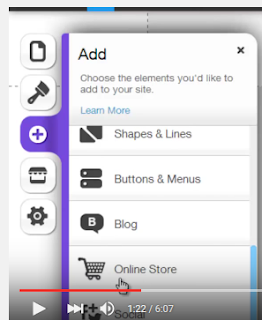
Wix manages to make intricate, fully-featured website design easy and intuitive - and there are plentiful online guides...

WordPress is the dominant player in the online website-builder market (DreamWeaver remains the dominant software option), but Wix boasts a vastly superior ease-of-use; there is a much steeper learning curve with WordPress. Other rivals such as Weebly are not only more limited but also charge for options bundled for free with Wix. According to this site, Wix is the third most-used online website builder.

Wix is largely controlled via drag and drop, with the ability to go into menus to edit site layouts - you should find it a highly user-friendly website builder... [You can read more basics at the Wix Wiki]
Wix.com's 90-second intro to working with Wix


If you do go on to look to monetise any of your work, a former student (Amber) who got a job handling e-commerce operations for a an online retailer on the back of her Media work, not least the blog, tells me they found the e-commerce provision in Wix quite problematic, and had to get onto the helpline frequently. How typical or not that is I have no idea!

BEFORE YOU GET TO WIX...
Read the guide on the steps involved in researching and planning your website.

YOUTUBE GUIDES
When I approach new software or ICT tools, YouTube is generally my first port of call. In time I will seek to create one or more vodcasts myself. You can use Wix's Help function and general online search for alternatives to video; eg this is Wix's step through guide to creating your own landing page (and the Wix site has a search box of course).

Wix provide this '10 must-see Wix techniques for Newbies' page which would be a good starting point too; it appears to initially load in Spanish (but then auto-translate into English).

EG1 - ANIMATED GALLERIES; EDIT COLOUR SCHEME; CREATE ICON
For now, take this short (3min) example. Its a run-through of just 5 tips, but shows you clearly how to do so - I'd skip to tips 3, 4 and 5 (animated galleries; changing the colour scheme; creating an icon for your website which can be embedded - just as the Twitter etc icons are - on other sites, including your social media) from 1:03 in:


EG2 - FULL RUN THROUGH OF SETTING UP, EDITING A WIX SITE
Here's a lengthier (17:33) overview, taking you through the entire process from picking a template to customising and adding your own content. I'd skip to 1:14.


EG3 - FULL RUN THROUGH OF SETTING UP, EDITING A WIX SITE
One more lengthy video guiding you through the full process; you can easily find more should you wish to(?!).
This one (25mins) is aimed at teachers, but again runs you through the process and various specific techniques:


It may be worth watching one or more full runthroughs to get a preview of some of the techniques involved, and perhaps some reassurance for the newbies that this is very manageable, but these videos aren't so useful once you're sat trying to figure out specific techniques. For that you'd want to find more specific guides - and perhaps look at web pages as well as videos, according to your own preference (video can be a slow way of getting precise information). Some examples follow, but I've gathered more into a Playlist, and will shortly point you to an official Wix playlist which you could use...

EG4 - ADDING MEMBER SIGNUP/LOGIN BUTTONS
A good example of the strengths and weaknesses of video tutorial; it starts with a minute of waffle (skip to 1:09 to avoid it), but is clear and easy to follow.


EG5 - APPS + ADDING A SEARCH FUNCTION
Whilst not entirely thrilled with his style, I clicked through to the 'ComputerMDofGilbert' channel and searched for Wix. This is one of ... lots of hits that came up; The Doc has put together guides on many of the topics you might want to figure out in time. Once again the first half is waffle (the final minute too!), but skip to 2:02 and you've got a good, clear, concise (really just 90 seconds!) guide thats very easy to follow.

In this example, you need to access an app, just as you might with your smartphone. These mostly follow a freemium model; the free version of the search tool here is limited to just 30 searches per month, but if you're concerned an examiner might think something is broken you can always have blogged a brief demonstration of it working (or pay for the app upgrade).


EG6 - E-COMMERCE
Business users appear to be the predominant Wix user, and many of the online guides are focussed on e-commerce. Much of the point of any contemporary music act website will be to raise revenue, through merchandise at least as much as through music (and Miley Cyrus was hardly the first to decide that giving away her music could still be a profitable model).

There's a complete start-to-finish walk through centred on e-commerce (the link skips a minute of waffle); a 14min 'Blogtrepreneur' guide; a feature promoting a specific Wix e-commerce app (Shopify); the Doc has done a shorter guide, which I've embedded below - as usual, there's waffle which you can skip by going to 1:08. Later, I'll highlight Wix's own video guides.

As I noted above, one former student who got work while still on the Media course through the quality of her blog experienced difficulties with real-world use of Wix's e-commerce tools, but how typical that anecdotal experience is I don't know.

EG7: ADDING SEO (search engine optimisation)
There are lots of videos on this too, a useful point for you to consider as part of your engagement with audience and use of technology. This example is from 'Website Builders Critic', a 6 min video - there's an exhaustive 40 minute webinar too!


A fragment of a 37-video Wix playlist, generally short (1-2mins) + focussed!

WIX'S PLAYLISTS OF VIDEO GUIDES
Wix themselves have produced a wide range of highly focussed video tutorials (in addition to the site's Help function). Have a browse by clicking through to the YouTube page on this video, part of a playlist of 37 videos, generally 1-2 minutes long and mostly highly specific. This is their guide on adding a shop to your site.


FOUR USEFUL LINKS FOR WIX
Simple 'Wix' search on YouTube.
ComputerMDofGilbert's Wix guides.
The Wix.com playlist.
10 Top Techniques For Newbies (wix.com).
...

Sunday, 30 August 2015

ASSESSMENT EXAMPLES Selected by exam board

This dates back to 2013, but the assessment criteria and levels remain the same: examples of productions in several grade boundaries from (almost) full marks to E grades. You can of course access plenty of past IGS productions, several of which achieved full marks (including on Research + Planning and Evaluations - several 100% marks have been recorded), but there is a range - click here for playlists and a blog listing hyperlinked student blogs by year with brief descriptions.

Click here to access the OCR weebly which contains the post. Note that the weebly doesn't provide an archive list of posts, one of the key reasons we use blogger (and something the exam board specifically state in annual reports must be included!).
The mark/60 is given underneath each embedded AS film opening